


A graph database is a database system designed to model and traverse complex relationships and networks effectively. It is especially useful when relationships are a central aspect of the data. The main use cases for graph databases are as follows:
- Social networking: Social networks are ideal for representing relationships between people as a graph. Users, friendships, group memberships, and so on can be modeled as nodes and edges, which makes it possible to implement social network analysis, recommendation systems, and more.
- Recommendation systems: By storing products, users, purchase histories, and the like in a graph database, you can analyze the complex relationships between users and products and provide personalized recommendations.
The problems above can be solved well enough with a relational database too. However, with a graph database you can solve even more complex queries with better performance.
What if you wanted to find out who — and how many — David’s parent’s parent’s parent’s child’s child’s children are? Or, in a social networking service, how would you find someone’s second-degree connections that are not first-degree?
In SQL, the query to find David’s relatives would have to be implemented somewhat like this.
WITH RECURSIVE Ancestors AS ( SELECT parent_id AS ancestor FROM ParentChild WHERE child_id = ( SELECT id FROM Person WHERE name = 'David' ) UNION ALL SELECT pc.parent_id FROM ParentChild pc INNER JOIN Ancestors a ON pc.child_id = a.ancestor),Descendants AS ( SELECT child_id AS descendant FROM ParentChild WHERE parent_id IN (SELECT ancestor FROM Ancestors) UNION ALL SELECT pc.child_id FROM ParentChild pc INNER JOIN Descendants d ON pc.parent_id = d.descendant)SELECT DISTINCT p.nameFROM Descendants dJOIN Person p ON d.descendant = p.id;By contrast, the query in a graph database looks like this.
graph .v('David') .out('parent') .out('parent') .out('parent') .in('parent') .in('parent') .in('parent') .unique() .run()Isn’t the graph database query far more intuitive to read? It can also be more advantageous in terms of memory and performance. Following on, the way to find a user’s second-degree connections that are not first-degree would look like this.
graph .v(1) .out('friend') .aggregate('firstDegree') // mark as first-degree friends .out('friend') .except('firstDegree') // exclude first-degree .unique() .property('name') .run()So, on what principles can a graph database be built? Let’s take a look at those principles.
Build Graph
Before creating the Query class that interprets the database’s query statements, let’s first build the class that makes up the basic Graph.
type VertexId = number | string
interface Vertex { _id: VertexId name: string _in: Edge[] _out: Edge[]}interface Edge { _in: Vertex _out: Vertex _label?: string}
type PartialVertex = { _id?: VertexId name: string}type PartialEdge = { _in: VertexId _out: VertexId _label?: string}
class Graph { vertices: Vertex[] = [] edges: Edge[] = [] private vertexIndex: Record<VertexId, Vertex> = {} private autoid: number = 1
constructor(V: PartialVertex[], E: PartialEdge[]) { this.addVertices(V) this.addEdges(E) }}It is simply a directed graph made up of vertices and edges. If no _id value is provided when a vertex is created, one is filled in automatically via autoid.
class Graph { private createVertex({ _id, name, ...rest }: PartialVertex): Vertex { if (!_id) _id = this.autoid++
return { _id, name, ...rest, _in: [], _out: [], } }
public addVertex(partialVertex: PartialVertex): VertexId { const vertex = this.createVertex(partialVertex)
const existingVertex = this.findVertexById(vertex._id) if (existingVertex) throw new Error('A vertex with id ' + vertex._id + ' already exists')
this.vertices.push(vertex) this.vertexIndex[vertex._id] = vertex return vertex._id }
public addEdge(partialEdge: PartialEdge): void { const inVertex = this.findVertexById(partialEdge._in) const outVertex = this.findVertexById(partialEdge._out)
if (!inVertex || !outVertex) throw new Error("One of the vertices for the edge wasn't found")
const edge: Edge = { _in: inVertex, _out: outVertex, _label: partialEdge._label, }
outVertex._out.push(edge) inVertex._in.push(edge) this.edges.push(edge) }
private addVertices(vertices: PartialVertex[]): void { vertices.forEach((vertex) => this.addVertex(vertex)) }
private addEdges(edges: PartialEdge[]): void { edges.forEach((vertex) => this.addEdge(vertex)) }
private findVertexById(vertex_id: VertexId): Vertex { return this.vertexIndex[vertex_id] }}This is the actual code that creates each vertex and edge. Since today’s topic is Query, we’ll just take a quick look and move on.
Query
Now let’s look at the part that performs a Query against a graph containing data.
type GremlinState = Record<string, any>
interface Gremlin { vertex: Vertex state: GremlinState}
interface State { vertices?: Vertex[] edges?: Edge[] gremlin?: Gremlin}
type Step = [string, any[]] // [pipetype, args]
class Query { graph: Graph state: State[] program: Step[] gremlins: Gremlin[]
constructor(graph: Graph) { this.graph = graph this.state = [] this.program = [] this.gremlins = [] }}The basic structure of a query looks like the above. It’s quite unfamiliar. Let’s go through it one piece at a time.
program is the variable that stores each step of the query. Each step consists of a pipe, which we’ll explain later.
Each step can hold state, and the query’s state stores the state corresponding to each step’s index.
A gremlin is a creature that moves through the graph according to our commands. The gremlin remembers where it has been and helps us find the answer to our query.
In graph DBs, the origin of the creature called a gremlin traces back to the Gremlin language.
The graph language we wrote earlier to find David’s relatives is the Gremlin query language.
graph .v('David') .out('parent') .out('parent') .out('parent') .in('parent') .in('parent') .in('parent')The function corresponding to each pipeline (step) is called a pipe, and in the example above the v, out, and in pipes were used. To store the pipe of each step, we add an add function to the Query class that appends a pipe to the program, and we add a v function on Graph that can start a query.
class Graph { ... public v(...args: any[]) { const query = new Query(this) query.add('vertex', args) return query }}
class Query { ... add(pipetype: string, args: any[]) { const step: Step = [pipetype, args] this.program.push(step) return this }}So what does pipetype mean here? We’ll find the answer in the next section.
Eager Loading Problem
Before looking at pipetype, we need to consider the strategy for executing the query statement we’re writing.
The first is a strategy that executes immediately as soon as a pipeline is encountered, and the second is a strategy that does not execute until it is truly needed. We’ll call the first one eager loading and the second one lazy loading.
If we execute the query with an eager loading strategy, a performance problem can arise when we look for David’s relatives. Even if the relatives we’re after actually number in the tens of thousands, that probably isn’t really the result we want. When displaying it in a service, we limit the nodes by filtering down to just as many as we’ll show, like .take(20). The query looks like this.
graph .v('David') .out('parent') .out('parent') .out('parent') .in('parent') .in('parent') .in('parent') .take(20)Because .take is at the very end, this can cause a problem. By contrast, if we process it with lazy loading, we only need to emit 20 results at the end, so we can avoid wasting unnecessary resources. In a graph database, it would be wise for us to handle execution in a lazy loading manner.
Now let’s build implementations of various pipetypes such as vertex, in, out, and take so they can be used when actually running queries. Before that, there is one thing we need to look at: the implementation of lazy loading for each pipeline.
Query run: interpreter
As discussed earlier, we want to build a query execution strategy based on lazy loading. To do that, we first need to read the query’s method chaining all the way to the end while storing every pipetype, and we also need to be able to trace back according to the execution plan. Writing the run function partially, it looks like this.
class Query { graph: Graph state: State[] program: Step[] gremlins: Gremlin[]
constructor(graph: Graph) { this.graph = graph this.state = [] this.program = [] this.gremlins = [] }
run() { const max = this.program.length - 1 let currentResult: MaybeGremlin = false const results = [] let done = -1 let pc = max
while (done < max) { const [operationType, parameters] = this.program[pc] const state = (this.state[pc] = this.state[pc] || {}) const operate = Dagoba.getPipetype(operationType)
currentResult = operate(this.graph, parameters, currentResult, state, pc - 1 <= done)Variable descriptions
- graph: The structure of the graph database.
- state: An array that stores the current state information for each step.
- program: An array that holds the sequence of operations to execute. For example, if the query
graph.v(1).out('knows').out().take(2)exists,programwould be something like[['v', [1]], ['out', ['knows']], ['out', []], ['take', [2]]]. - max: The index of the last operation to execute.
- currentResult: A temporary variable that stores the result of the current operation.
- results: An array that stores the final results.
- done: The index of the last completed operation.
- pc: The program counter, the index of the operation currently being executed.
Execution flow
- Initialization:
pcis initialized to the index of the last operation (max).doneis set to -1, indicating that initially no operations have been completed. - Main loop: The loop runs while
doneis less thanmax. It continues until all operations are completed. - Operation execution: The operation type and parameters are extracted from
program[pc], and the function matching that operation type (Dagoba.getPipetype(operationType)) is called and executed. The result of the operation is stored incurrentResult.
The next part of the logic looks like this.
32 collapsed lines
class Query { graph: Graph state: State[] program: Step[] gremlins: Gremlin[]
constructor(graph: Graph) { this.graph = graph this.state = [] this.program = [] this.gremlins = [] }
run() { const max = this.program.length - 1 let currentResult: MaybeGremlin = false const results = [] let done = -1 let pc = max
while (done < max) { const [operationType, parameters] = this.program[pc] const state = (this.state[pc] = this.state[pc] || {}) const operate = Dagoba.getPipetype(operationType)
currentResult = operate( this.graph, parameters, currentResult, state, pc - 1 <= done, ) if (currentResult == 'pull') { currentResult = false if (pc - 1 > done) { pc-- continue } else { done = pc } }
if (currentResult == 'done') { currentResult = false done = pc }
pc++
if (pc > max) { if (currentResult) results.push(currentResult) currentResult = false pc-- } }
return results.map((gremlin) => gremlin.result != null ? gremlin.result : gremlin.vertex, ) }}-
Result handling:
- ‘pull’ result: If the current operation requires more input (
pull),currentResultis set tofalse, and we go back to the previous step (pc - 1) and continue the operation. - ‘done’ result: If the current operation is complete (
done),currentResultis set tofalse, anddoneis updated to the currentpcvalue.
- ‘pull’ result: If the current operation requires more input (
-
Index adjustment: The
pcvalue is incremented to move to the next operation. Ifpcis greater thanmax, then if the current result (currentResult) is valid it is added to the results array,currentResultis set tofalse, andpcis decremented to go back to the previous step. -
Returning results: The final results array is mapped to extract the result of each Gremlin and return it. If there is no result (
null), the Gremlin’s vertex is returned.
In other words, depending on the result of each pipetype, pc can continuously move left or right. When pc moves to the right, the result of the previously performed operation is stored in currentResult as a gremlin (or as false, etc.).
The role of done
A done situation arises when a particular operation is complete and there is no longer any need to proceed. Looking closely at the role of done in the code and when it is set, done is updated in the following two main situations:
-
When ‘pull’ is returned, and when we cannot go back to a previous step:
- When
currentResultreturns ‘pull’, it means the current operation needs additional data or input. In this case,pc(the program counter) is decremented to perform the operation of the previous step again. - If
pc - 1is less than or equal todone(if (pc - 1 <= done)), all of the previous steps’ operations are considered already complete, so there is no previous step left to go back to. At this point,doneis set to the currentpcvalue, marking everything up to the current operation as complete.
- When
-
When an operation returns ‘done’:
- When an operation function returns a ‘done’ result, it means that operation is fully complete. Therefore,
currentResultis set tofalseanddoneis updated to the currentpcvalue. This indicates that the operation is complete and there is no longer any need to execute it.
- When an operation function returns a ‘done’ result, it means that operation is fully complete. Therefore,
These two situations indicate the points where an operation should stop rather than proceed further, and they are important checkpoints in the query execution process.
As a result, running the run function returns the result nodes we want, contained in the results variable.
Pipetypes
Pipetypes are the core of the dagoba system. Understanding how each one works lets you better understand how they are called and ordered in the interpreter.
class Dagoba { static Pipetypes: Record<string, Function> = {}
static addPipetype(name: string, fun: Function) { Dagoba.Pipetypes[name] = fun Query.prototype[name] = function () { return this.add(name, [].slice.apply(arguments)) } } static getPipetype(name: string) { return Dagoba.Pipetypes[name] }}Calling the addPipetype function adds a pipe type that can be invoked in a query. And inside the Query class, when each pipeline is evaluated, the pipetype function is retrieved by calling the getPipetype function.
pipetype: vertex
The vertex pipetype is responsible for creating gremlins at the relevant node. It gathers all vertices that match the condition and creates gremlins one at a time.
Dagoba.addPipetype('vertex', function (graph, args, gremlin, state) { if (!state.vertices) state.vertices = graph.findVertices(args) // state initialization
if (!state.vertices.length) // all done return 'done'
const vertex = state.vertices.pop() // OPT: this relies on cloning the vertices return Dagoba.makeGremlin(vertex, gremlin.state) // we can have incoming gremlins from as/back queries})pipetype: in-out
Traversing to the next node along the edges connected to a graph node is very easy.
Dagoba.addPipetype('in', simpleTraversal('in'))Dagoba.addPipetype('out', simpleTraversal('out'))In the simpleTraversal function, the ‘in’ and ‘out’ directions represent the edges coming into and going out of the relevant node, respectively. This function is responsible for the process of traversing to the next node in the graph structure.
const simpleTraversal = function (dir) { // handles basic in and out pipetypes const find_method = dir == 'out' ? 'findOutEdges' : ('findInEdges' as const) const edge_list = dir == 'out' ? '_in' : ('_out' as const)
return function (graph, args, gremlin, state) { if (!gremlin && (!state.edges || !state.edges.length)) // query initialization return 'pull'
if (!state.edges || !state.edges.length) { // state initialization state.gremlin = gremlin state.edges = graph[find_method](gremlin.vertex) // get edges that match our query .filter(Dagoba.filterEdges(args[0])) }
if (!state.edges.length) // all done return 'pull'
const vertex = state.edges.pop()[edge_list] // use up an edge return Dagoba.gotoVertex(state.gremlin, vertex) }}In the function’s execution flow, there is first a query- and state-initialization step. If no Gremlin object exists or there are no more edges to process, it returns ‘pull’ to request additional information. If a Gremlin exists but its initial state has not yet been set, it finds the edges in the appropriate direction from the current vertex and adds them to the state information.
Next, the edge-processing step proceeds. If there are no edges left to process, it again returns ‘pull’ to stop the traversal. If there are edges left, it uses one of them to move to the next vertex, then creates and returns a new Gremlin object so it can be handled by the next pipetype.
pipetype: property
The property pipetype is responsible for extracting the value of a specific property of a node.
Dagoba.addPipetype('property', function (graph, args, gremlin, state) { if (!gremlin) return 'pull' // query initialization gremlin.result = gremlin.vertex[args[0]] return gremlin.result == null ? false : gremlin // undefined or null properties kill the gremlin})The function’s execution flow first includes a query-initialization step. In this step, if no Gremlin object exists, the function returns ‘pull’.
It extracts the desired property from the Gremlin object’s current node and sets it as the result. If the property value that gets set is null or undefined, the function returns false, which terminates the Gremlin’s traversal.
pipetype: unique
The unique pipetype prevents visiting duplicate nodes, which improves the efficiency of data processing and removes unnecessary repetition during traversal.
Dagoba.addPipetype('unique', function (graph, args, gremlin, state) { if (!gremlin) return 'pull' // query initialization if (state[gremlin.vertex._id]) return 'pull' // we've seen this gremlin, so get another instead state[gremlin.vertex._id] = true return gremlin})First, the function checks whether a Gremlin object exists. If there is no Gremlin object, it returns ‘pull’ to request additional data in the query-initialization step.
Next, the function checks whether the node visited by the current Gremlin has already been visited. To do this, it uses the state object state, storing whether each node has been visited using the node’s unique ID as the key. If the current node has already been visited, it returns ‘pull’ to request another Gremlin.
If the current node has not been visited before, it stores that node’s ID in the state object and returns the Gremlin object as is. By doing so, the function ensures each node is traversed only once.
pipetype: filter
The filter pipetype lets you specify filtering conditions in various ways, and it continues the traversal only for nodes that satisfy the condition.
Dagoba.addPipetype('filter', function (graph, args, gremlin, state) { if (!gremlin) return 'pull' // query initialization
if (typeof args[0] == 'object') // filter by object return Dagoba.objectFilter(gremlin.vertex, args[0]) ? gremlin : 'pull'
if (typeof args[0] != 'function') { Dagoba.error('Filter arg is not a function: ' + args[0]) return gremlin // keep things moving }
if (!args[0](gremlin.vertex, gremlin)) return 'pull' // gremlin fails filter function return gremlin})As with the other pipetype functions, if there is no Gremlin it returns ‘pull’. After that, filtering is done depending on the type of the argument (object or function), and if it passes, the Gremlin is returned as is for the next traversal.
pipetype: take
The take pipetype selects only a specified number of nodes from among the nodes being traversed in the graph database, and stops the traversal after that.
Dagoba.addPipetype('take', function (graph, args, gremlin, state) { state.taken = state.taken || 0 // state initialization
if (state.taken == args[0]) { state.taken = 0 return 'done' // all done }
if (!gremlin) return 'pull' // query initialization state.taken++ // THINK: if this didn't mutate state, we could be more return gremlin // cavalier about state management (but run the GC hotter)})The function first checks the initialization of the state object state. Here, state.taken is the variable that stores the number of nodes taken so far, and it is initially set to 0.
During the traversal, it first checks whether it has already processed as many nodes as the specified count (args[0]). If it has already processed the specified number of nodes, it resets state.taken to 0 and returns ‘done’ to terminate the traversal.
Then it checks whether a Gremlin object exists. If there is no Gremlin object, it returns ‘pull’ to request additional data and proceeds with query initialization.
If a Gremlin object exists, it increments state.taken by 1 to update the number of nodes processed so far. After that, it returns the current Gremlin object to continue the traversal.
pipetype: as
The as pipetype provides the ability to tag a node being traversed in the graph database with a specific label. This makes it possible to reference or revisit a specific point later.
Dagoba.addPipetype('as', function (graph, args, gremlin, state) { if (!gremlin) return 'pull' // query initialization gremlin.state.as = gremlin.state.as || {} // initialize gremlin's 'as' state gremlin.state.as[args[0]] = gremlin.vertex // set label to the current vertex return gremlin})First, the function checks whether a Gremlin object exists. If there is no Gremlin object, it returns ‘pull’ to request the additional data needed in the query-initialization step.
Next, it initializes the Gremlin object’s ‘as’ state. Here, gremlin.state.as is an object that stores the nodes tagged so far. If this state has not yet been set, it is initialized to a new object.
The function assigns the node currently being traversed (gremlin.vertex) to a specific label (args[0]). This label is the argument the user specified when calling the function.
pipetype: except
The except pipetype excludes specific nodes during the graph database’s traversal process.
Dagoba.addPipetype('except', function (graph, args, gremlin, state) { if (!gremlin) return 'pull' // query initialization
if ( gremlin.state.as && gremlin.state.as[args[0]] && gremlin.vertex == gremlin.state.as[args[0]] ) return 'pull' // TODO: check for nulls return gremlin})The function checks whether a Gremlin object exists. If no Gremlin object exists, it returns ‘pull’ to proceed with the query-initialization step along with the request for additional data.
First, it checks whether the node of a specific label stored in the gremlin.state.as object is the same as the node currently being traversed. This label is specified by the argument (args[0]) provided when the function is called. If the current node is identical to the node tagged with this label, it returns ‘pull’ to exclude that node from the traversal results.
pipetype: back
The back pipetype provides the ability to return, during the graph database’s traversal process, to a node tagged with a specific label.
Dagoba.addPipetype('back', function (graph, args, gremlin, state) { if (!gremlin) return 'pull' // query initialization return Dagoba.gotoVertex(gremlin, gremlin.state.as[args[0]]) // TODO: check for nulls})First, it references the as object stored inside the Gremlin object’s state. Inside this object, labels and references to the nodes assigned to those labels are stored. The function uses this information to return to the node of the label specified by the argument provided at call time.
If a node corresponding to the specified label exists, it uses the Dagoba.gotoVertex function to move the Gremlin’s position to that node.
Examples
Using the query and pipetypes implemented above, we can build several examples.
Acquaintance relationships
class DagobaTest1 { static run() { const V = [ { name: 'alice' }, // alice gets auto-_id (prolly 1) { _id: 10, name: 'bob', hobbies: ['asdf', { x: 3 }] }, ] const E = [{ _out: 1, _in: 10, _label: 'knows' }]
const graph = Dagoba.graph(V, E)
graph.addVertex({ name: 'charlie', _id: 'charlie' }) graph.addVertex({ name: 'delta', _id: '30' }) graph.addEdge({ _out: 10, _in: 30, _label: 'parent' }) graph.addEdge({ _out: 10, _in: 'charlie', _label: 'knows' })
// @ts-ignore const result1 = graph.v(1).out('knows').out().run() console.log(result1)
// @ts-ignore const qb = graph.v(1).out('knows').out().take(1).property('name') const result2 = qb.run() const result3 = qb.run() const result4 = qb.run() console.log(result2, result3, result4) }}
DogobaTest1.run()Building the graph, it looks like this.
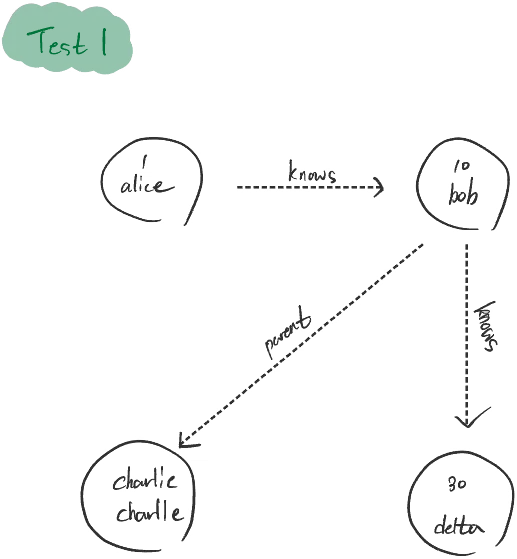
First query execution (result1):
graph.v(1).out('knows').out().run(): Starting from the node with ID 1 (Alice), it moves to the node connected via the ‘knows’ relationship (Bob), and then traverses the nodes related to Bob. Since Bob has relationships with two nodes, Delta and Charlie, these nodes are returned as the result.
Second query series (result2, result3, result4):
graph.v(1).out('knows').out().take(1).property('name'): This query chain starts from Alice, goes through Bob, selects one (take(1)) of the nodes connected to him, and extracts the name property of the selected node. Since take(1) is applied, the first execution returns the name of the first node related to Bob (either Delta or Charlie) as the result. The second run() returns the name of the second node, and the third returns an empty array because there are no more nodes to return.
result1: [ { _id: 'charlie', name: 'charlie', _in: [[Object]], _out: [] }, { _id: '30', name: 'delta', _in: [[Object]], _out: [] },]result2: ['charlie']result3: ['delta']result4: []Course enrollment
class DagobaTest2 { static run() { const V = [ { name: 'Alice', _id: 1, type: 'student' }, { name: 'Bob', _id: 2, type: 'student' }, { name: 'Charlie', _id: 3, type: 'student' }, { name: 'Mathematics', _id: 4, type: 'course' }, { name: 'Computer Science', _id: 5, type: 'course' }, ]
const E = [ { _out: 1, _in: 4, _label: 'enrolled' }, { _out: 1, _in: 5, _label: 'enrolled' }, { _out: 2, _in: 4, _label: 'enrolled' }, { _out: 3, _in: 5, _label: 'enrolled' }, ]
const graph = Dagoba.graph(V, E)
const dualEnrolledStudents = graph .v() // @ts-ignore .filter({ type: 'student' }) .as('student') .out('enrolled') .filter({ name: 'Mathematics' }) .back('student') .out('enrolled') .filter({ name: 'Computer Science' }) .back('student') .unique() .property('name') .run() console.log( 'Students enrolled in both Mathematics and Computer Science:', dualEnrolledStudents, ) }}DogobaTest2.run()Building the graph, it looks like this.
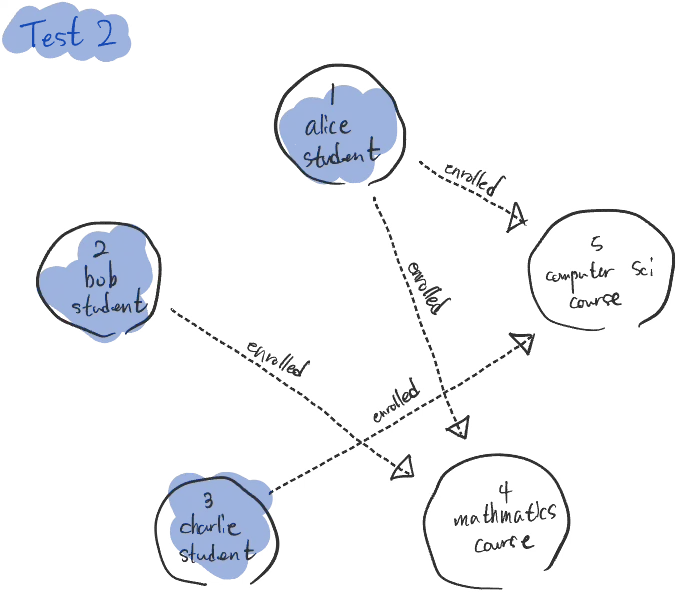
The query’s purpose is to find students who are enrolled in both Mathematics and Computer Science. It may look a bit complex, but let’s interpret it step by step.
- Filtering students: Among all vertices, select only those whose
typeis ‘student’. - Setting the student tag: Tag each student vertex with the label ‘student’.
- Filtering the Mathematics course: Among the courses each student is enrolled in, filter for those enrolled in “Mathematics”.
- Returning to the original student vertex: Use the ‘student’ tag to return to the original student vertex. If, during the Mathematics course filtering, no gremlin existed because there was no such course, it does not return to the original student and instead returns ‘pull’.
- Filtering the Computer Science course: Filter again for courses where the same student is enrolled in “Computer Science”. Likewise, if no gremlin existed during the Computer Science course filtering because there was no such course, it does not return to the original student and instead returns ‘pull’.
- Removing duplicates: Reaching this point means the student was enrolled in both courses. Use the
uniquefunction to remove duplicates so the same student information is not repeated. - Extracting the student’s name: Finally, extract the ‘name’ property of the selected students.
Students enrolled in both Mathematics and Computer Science: [ 'Alice' ]Second-degree but not first-degree
class DagobaTest3 { static run() { const V = [ { _id: 1, name: 'User1' }, { _id: 2, name: 'User2' }, { _id: 3, name: 'User3' }, { _id: 4, name: 'User4' }, { _id: 5, name: 'User5' }, { _id: 6, name: 'User6' }, { _id: 7, name: 'User7' }, { _id: 8, name: 'User8' }, { _id: 9, name: 'User9' }, { _id: 10, name: 'User10' }, ]
const E = [ { _out: 1, _in: 2, _label: 'friend' }, { _out: 1, _in: 3, _label: 'friend' }, { _out: 1, _in: 4, _label: 'friend' }, { _out: 1, _in: 9, _label: 'friend' }, { _out: 1, _in: 10, _label: 'friend' }, { _out: 2, _in: 5, _label: 'friend' }, { _out: 2, _in: 6, _label: 'friend' }, { _out: 3, _in: 7, _label: 'friend' }, { _out: 3, _in: 8, _label: 'friend' }, { _out: 4, _in: 9, _label: 'friend' }, { _out: 4, _in: 10, _label: 'friend' }, { _out: 5, _in: 10, _label: 'friend' }, { _out: 6, _in: 10, _label: 'friend' }, { _out: 7, _in: 1, _label: 'friend' }, { _out: 8, _in: 9, _label: 'friend' }, { _out: 9, _in: 2, _label: 'friend' }, { _out: 9, _in: 6, _label: 'friend' }, { _out: 10, _in: 3, _label: 'friend' }, ]
const graph = Dagoba.graph(V, E)
const secondDegreeFriendsOfUser3 = graph .v(1) // start from user 1 // @ts-ignore .out('friend') // first-degree friends .aggregate('firstDegree') // mark as first-degree friends .out('friend') // second-degree friends .except('firstDegree') // exclude first-degree .unique() // remove duplicates .property('name') // extract name .run() // run the query
console.log('2nd degree friends of User 1:', secondDegreeFriendsOfUser3) }}DogobaTest3.run()Building the graph, it looks like this.
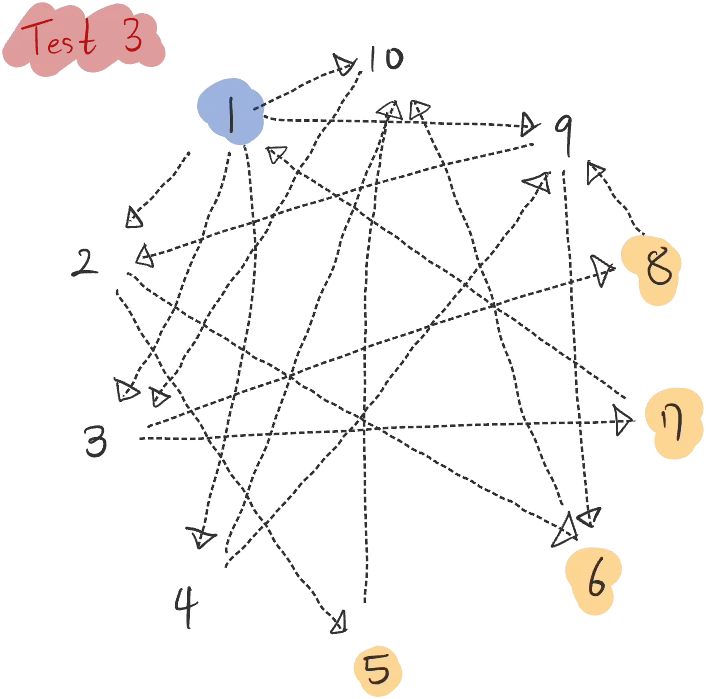
This is the query mentioned at the beginning of this article. The query itself is simple.
const secondDegreeFriendsOfUser3 = graph .v(1) // start from user 1 // @ts-ignore .out('friend') // first-degree friends .aggregate('firstDegree') // mark as first-degree friends .out('friend') // second-degree friends .except('firstDegree') // exclude first-degree .unique() // remove duplicates .property('name') // extract name .run() // run the query dHowever, there is one pipetype here that we haven’t seen before: aggregate. Why couldn’t we just designate the first-degree friends with as and exclude them?
The main reason for using the aggregate pipetype is to collect multiple items and aggregate the results processed at a particular step partway through, so they can be referenced later. The as pipetype and the aggregate pipetype can perform similar functions, but they differ in purpose and usage.
as is mainly used to mark a specific point in the current node or path so that a “back” operation can be performed in a later query step. It is mainly used to store a reference to a single element, and it can tag only one node at a time. Therefore, it is not suitable for aggregating many nodes or for grouping multiple nodes to be reused in a later query.
aggregate can collect multiple nodes into a collection, and this collection can become the target of filtering or other operations in later query steps. So let’s additionally implement the aggregate pipetype and tweak the code a bit so that except can also recognize this aggregate.
Dagoba.addPipetype('aggregate', function (graph, args, gremlin, state, done) { if (!done && !gremlin) return 'pull' // query initialization state.aggregate = state.aggregate || {} // initialize gremlin's 'aggregate' state if (!state.aggregate[args[0]]) state.aggregate[args[0]] = []
if (done) { if (!state.aggregated) { state.aggregated = true state.vertices = [...state.aggregate[args[0]]] }
const vertex = state.vertices.pop() if (!vertex) return 'pull' const gremlin = Dagoba.makeGremlin(vertex, state) return gremlin }
state.aggregate[args[0]].push(gremlin.vertex) gremlin.state.aggregate = gremlin.state.aggregate || {} gremlin.state.aggregate[args[0]] = state.aggregate[args[0]]
return 'pull'})
Dagoba.addPipetype('except', function (graph, args, gremlin, state) { if (!gremlin) return 'pull' // query initialization
if ( gremlin.state.aggregate[args[0]] && gremlin.state.aggregate[args[0]].includes(gremlin.vertex) ) return 'pull' if ( gremlin.state.as && gremlin.state.as[args[0]] && gremlin.vertex == gremlin.state.as[args[0]] ) return 'pull' // TODO: check for nulls return gremlin})Data collection:
- Each node being traversed is added to the specified set (
args[0]). The name of this set is provided as an argument when the function is called. For example, if the user provides the argument ‘firstDegreeFriends’, the nodes are aggregated under that name.
Conditional processing and returning results:
- Once all data has been collected — that is, once the
doneflag is set to true — the collected nodes are popped one at a time, a Gremlin is created from each, and it is returned. This process repeats until all nodes have been processed. - If there are no more nodes to return, it returns ‘pull’ so the traversal can continue.
State management
- The
state.aggregatedflag tracks whether the collected nodes have already been processed. If this flag has not been set — that is, the first time thedonecondition is satisfied — the collected nodes are copied into an array to prepare to process them in order. - After each node is processed, a node is removed one at a time from the
state.verticesarray, and a new Gremlin is created from that node and returned.
The result is as follows.
2nd degree friends of User 1: [ 'User6', 'User5', 'User8', 'User7' ]Summary
While studying the principles of graph databases, I was able to look a little more deeply into the concept of lazy loading and into the most common logic of an interpreter. I was also fascinated by being able to write relationship-based queries intuitively. If I spent more time on it, I think I could write a variety of pipetypes — in the sense of maintaining or even improving the level of performance — to make queries shorter or more versatile.
The code I wrote while doing this case study is available here.