

This is a 2024 paper written by Google in collaboration with the University of Florida. It enumerates 13 vulnerabilities that can arise when handling file uploads in a Node.js environment, and analyzes how susceptible popular, widely-used file-upload libraries are to these vulnerabilities.
By going through these vulnerabilities, we can learn what kinds of defensive logic should be implemented on the server when handling file uploads.
In Node.js, file-upload logic is usually implemented using third-party libraries. Representative examples include libraries such as formidable and multer. The paper identifies the potential UFU exposure when file uploads are implemented using such libraries. If a web application is exposed to a UFU (Unrestricted File Upload) and exploited by an attacker, it can lead to serious security incidents such as XSS or the leakage of other users’ personal information.
Attack descriptions
This section classifies UFU vulnerabilities in detail and explains how each attack technique works. The full set of 13 attack types is divided into several categories, including file name manipulation, file metadata tampering, content-based attacks, and path and permission bypassing. We examine, with concrete examples, what risks each technique can introduce in real-world environments. The attack techniques in each category are then described in detail, in order, from A1 through A13.
1. File name-based attacks
File name-based attacks refer to techniques that manipulate only the name of the file uploaded by the client in order to bypass the server’s validation logic, or to cause secondary damage such as malicious script execution or path traversal. Because this attack is possible simply by cleverly editing strings, without any tampering of the file contents, the server side must always perform strict validation and normalization of file names. Representative examples include disguising a file as having an allowed extension by inserting duplicate extensions, injecting null bytes, or mixing letter cases, as well as hiding scripts that include specific system commands.
[A1] File Extension Injection
In this attack, the attacker modifies the file name’s extension in order to exploit improper file name extension handling in the web application. For example, the attacker may insert multiple file extensions to bypass file validation logic based on the file extension.
Taking a seed file such as test.js as input, the attacker may inject multiple randomly attached extensions, such as test.js.png (hiding the malicious .js extension and making it appear as .png) or test.png.js (appending an executable .js after a valid .png extension), or may remove the file extension entirely, such as test (removing the extension completely). In addition, the attacker may disguise the extension by randomly changing its letter case, such as test.Js or testJS, or add unusual extensions such as seed.html5 or test.js6. The attacker may even add three extensions, such as seed.pdf.html.png, mix letter cases randomly, such as test.hTml.jPEg, or use unusual extensions such as jsx, mjs, or xhtml.
[A2] Null Byte Injection
In this attack, the attacker inserts a null byte into the file name in order to alter the application’s intended logic.
The attacker may insert it into various parts of the file name to carry out this type of attack. For example, similar to the File Extension Injection attack (A1), the attacker inserts a null byte between a forbidden extension and an allowed extension to alter the intended logic of the target Node.js application.
For instance, by inserting a null byte character at an arbitrary position within the file name, the attacker creates file names such as test.js%00.png or test.js%.png.
Null byte character injection attacks may not actually be a major problem in a Node.js environment. They can, however, cause problems in a C language environment.
char s[] = "test.js\0.png";printf("%s", s); // output: "test.js"As shown above, the string after the null byte can be excluded. If Node.js, when parsing the file name, uses not only the JS API but also C-based third-party tools (such as ImageMagick or FFmpeg), it can become vulnerable.
[A3] Script-named file name
In this attack, the attacker inserts a script, such as an XSS payload, into the file name, and if the uploaded file name is not properly sanitized, it can trigger execution of the payload in the victim’s browser.
A JavaScript seed payload file name such as test.png.js can be transformed by injecting a script payload at an arbitrary position within the file name, such as test.png[payload].js.
[A4] Path Traversal
In this attack, the attacker inserts malicious characters into the file name to perform a path traversal attack, allowing access to directories outside the Node server’s restricted directory.
Taking a valid PNG file file.png as input, the attacker can create a file name such as /../..png.
[A5] Overwrite Attack
In this attack, the attacker maliciously alters the server configuration by aiming to overwrite files on the web application server, particularly targeting server configuration files. Through this attack, the attacker can externally control important configuration files that play a critical role in the operation of the target web application.
2. File type-based attacks
This category covers techniques that bypass the server’s file type validation logic by manipulating file metadata or header information. By tampering with the MIME type, magic byte (file signature), or other header fields sent by the client, the attacker makes the server recognize the file as the wrong format, enabling malicious payload execution or the storage of unauthorized files. This section examines MIME type spoofing, magic byte tampering, and polyglot file attacks that combine different formats, from A6 through A10.
[A6] MIME Type Spoofing
A file’s content-type indicates the file’s MIME type, which describes the file and its structure. A file-upload library may use the MIME type to validate the file type. However, an attacker can easily bypass this attempt by modifying or spoofing the file’s content type. If the target server relies solely on MIME type checks to validate the file content, then through MIME type spoofing the attacker can bypass the check, upload a malicious payload file, and induce code execution on the server side.
The attacker uploads a file that is actually a JavaScript file (test.js) but changes the Content-type of the HTTP request to a different, allowed MIME type such as application/pdf. If the server validates the file based only on the MIME type, it recognizes this malicious .js file as a PDF and allows the upload.
[A7] Magic Byte Spoofing
Another technique used to validate the file type is checking the magic header byte. An attacker can create a malicious file such as a script and change its magic byte to that of a different file type, such as a PNG file, in order to bypass the file type validation performed by the web application. This attack can lead to malicious code execution on the server.
A Polyglot file is valid in multiple different file formats, so an attacker can create such a file to hide a malicious payload and bypass the web application’s file type validation logic. Unlike spoofing-based attacks, in which the attacker changes only the file’s magic bytes and/or MIME type, a polyglot file is constructed by merging the syntax and semantics of multiple file formats. As a result, a web application may be resilient against spoofing-based attacks but vulnerable to polyglot file attacks. Polyglot files can be used to inject malicious scripts and bypass the content security policy of a web application’s file-upload mechanism, and can lead to various types of attacks such as XSS and RCE.
The attacker creates an executable script file (malicious.sh or malicious.php) and inserts the magic bytes of a PNG file, 89 50 4E 47 0D 0A 1A 0A, at the beginning of the file. This file may be recognized as a PNG file by the magic byte check, but it contains a malicious script inside that can be executed under certain conditions after upload.
[A8] JS+JPEG Polyglot
This type of polyglot file is valid in both the JPEG and JS file formats. If the web application’s content filtering mechanism allows it as a JPEG file, it is uploaded to the server. Once the file is uploaded to the web application server, the attacker can access the file remotely or execute a malicious payload that can crash the server during parsing.
The attacker reads an existing PNG(JPEG) file, calculates the header size, and creates a PNG+JS polyglot file by injecting a JavaScript payload into the file after a null byte sequence, without affecting its validity as a PNG image. Once this file is uploaded to the server, the attacker can access the file remotely or cause the server to crash during parsing, executing the malicious payload.
However, the risk of this vulnerability is not actually very high. In modern browsers, when a
polyglotfile (test.jpg) is run via animgtag, thejscode is not executed. But if this file is run via<script src=”test.jpg”/>or in aniframe, thejscode is interpreted and executed. There is usually little reason to run ajpgfile via ascriptoriframetag, but you should still be aware that execution is possible.
[A9] HTML+PDF Polyglot
A PDF+HTML polyglot file is valid in both the PDF and HTML file formats. An attacker can use it to bypass the web application’s content security checks and inject a malicious payload within an HTML file. Similar to the JS+JPEG Polyglot file, the attacker can access the file remotely in the browser and execute the malicious payload.
[A10] Executable File Upload Attack
In this attack, the attacker uploads an executable file (for example, EML or HTML) that can be executed on the client or server side of the web application. In this attack, the attacker uploads an HTML payload file to the target web application. The uploaded payload file can redirect the victim to a malicious website or execute the JavaScript payload contained in the payload file.
3. File content-based attacks
This category covers attack techniques that transform the actual content inside a file (the byte stream, compression format, script sections, and so on) or inject malicious code, so that it executes on the server or in the user’s browser. Rather than targeting just the file name or metadata, these attacks target the structure and content of the file itself, and can cause XSS, DoS, RCE, and more. This section explains the main attack methods from A11 through A13, including script injection inside PDF documents, compression bombs, and inline script injection in SVG files.
[A11] JavaScript Embedded PDF
In this attack, the attacker injects malicious JavaScript code inside a PDF document. For example, the attacker can inject a JavaScript payload into a PDF document and upload it to a web application to carry out a stored XSS attack.
The attacker can inject a JavaScript payload into a PDF document and upload it to a web application to carry out a stored XSS attack.
[A12] PDF Bomb Attack
This attack involves the attacker abusing the encoding options of a PDF file to compress streams. When a malicious PDF file is uploaded to the web application server, decompressing the content can consume resources on the target server, causing a DoS condition.
[A13] SVG File Upload Attack
The SVG file attack abuses the ability of SVG files to support inline JavaScript code. In this attack, the attacker injects a JS payload into an SVG file to carry out various types of attacks such as XSS. In this attack, the attacker injects a JS payload into an SVG file in order to achieve various types of attacks such as XSS.
The attacker creates an SVG file containing a malicious script in the form of an icon and uploads it; when a user opens this file in a browser or it is displayed on a web page, the script executes and can steal the user’s session information or redirect them to a malicious website.
Analyzing Libraries & Applications
Based on the vulnerabilities above, the paper developed a tool called NodeSec that can analyze them, and applied and analyzed it against libraries and real applications popularly used in actual Node.js environments.
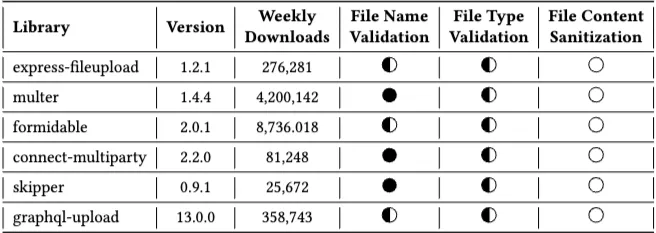
The libraries above are reported to have been insecure against File content-based attacks (A11 ~ A13).
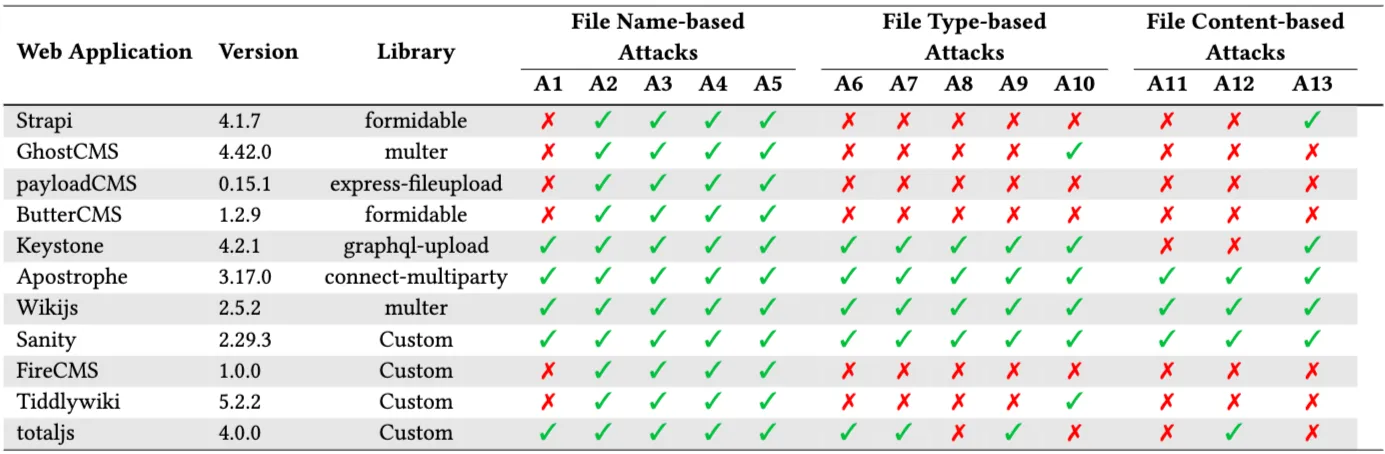
When NodeSec was applied to real production applications (see versions), the results above were obtained.
Root Causes & Recommendations
The paper points out that the fundamental cause of file-upload vulnerabilities is the lack of comprehensive security documentation. This shortcoming is a significant problem for developers who are not well-versed in security, because they may not be aware of these issues.
There is also the problem of a lack of security test cases. The paper argues that if, after implementing a service, standardized test cases could be run to find problems in bulk, the likelihood of security incidents could be reduced.
So, what can we do?
To implement secure file uploads in a Node.js application, three main objectives must be achieved.
- File Name Validation
Assign a randomly generated, safe string (e.g., a UUID) to the uploaded file name. This fundamentally prevents malicious characters injected by the attacker from being included in the file name, neutralizing most file name-based attacks.
Implement a file name sanitization function that removes malicious characters from the file name, or integrate a third-party package that performs this. For example, wikijs uses the sanitize-filename package to process uploaded file names.
- File Type Validation
The MIME type provided by the client can be easily spoofed and therefore should not be trusted. You must not rely on checking only the MIME type in the file-upload request.
Because the Content-Type header provided by the client can be easily manipulated, ignore it or use it only as a minimal first-pass filter. It can be easily manipulated.
Identify the actual file format by reading the file’s content and checking the magic byte or file signature. Libraries such as file-type, exif-js, and image-type can be used.
Strictly maintain a whitelist of allowed file formats, and reject all other files.
For file formats that can contain scripts, such as HTML and SVG, always apply File Content Sanitization to remove script tags.
- File Content Sanitization
Malicious content embedded inside a file (e.g., scripts) must be sanitized.
Use open-source packages to sanitize files or to set security headers that prevent arbitrary code execution. For example, use the sanitize-html package to defend against the SVG upload attack (A13).
It is also important to add file size limits and validation to prevent DoS attacks such as A12 (the PDF bomb attack).